For some of us, social media is a fun way to connect with friends, reshare memes, and wind down after a long day. What may seem simple, like posting articles, sharing photos, or publishing content, becomes more complicated when it comes to your business.Social media marketing, unlike the passive use of social networks, requires planning and strategy.
Summary
Having an editorial plan for social media will help you develop strategic content, post consistently, and achieve tangible results from your efforts. Here’s how to do it.
Why create an editorial plan for social media?
Maybe you’re used to creating all your posts directly in your social apps. While this requires less planning, it can be much less effective than developing a strategy. An editorial calendar is a must when it comes to developing effective topics and engaging content. With a social media editorial calendar, you can:
Plan your topics in advance. You can dedicate time to researching topics and content ideas that fit your audience.
Schedule your posts. Establish a content publishing cadence so your audience can rely on your posts, and the algorithms will surface them more often.
Measure results. In-app analytics let you see how your posts perform. When you plan your editorial calendar, you can use this information to find new ideas or repurpose what already works.
Balance evergreen and trending content. You have the flexibility to publish current content while also prioritizing evergreen content that will remain relevant in the long term.
Anticipate future events. If your business has upcoming events or updates, you can plan your content far in advance and generate greater visibility for your brand.
Save digital assets. Not only can you batch-create your social content, but you’ll have a library of creative assets to draw from whenever you need them.
Monitor hashtags. You can create an up-to-date list of popular hashtags and use them in your future posts. There’s no need to research new hashtags every time.
What to include in your social editorial calendar
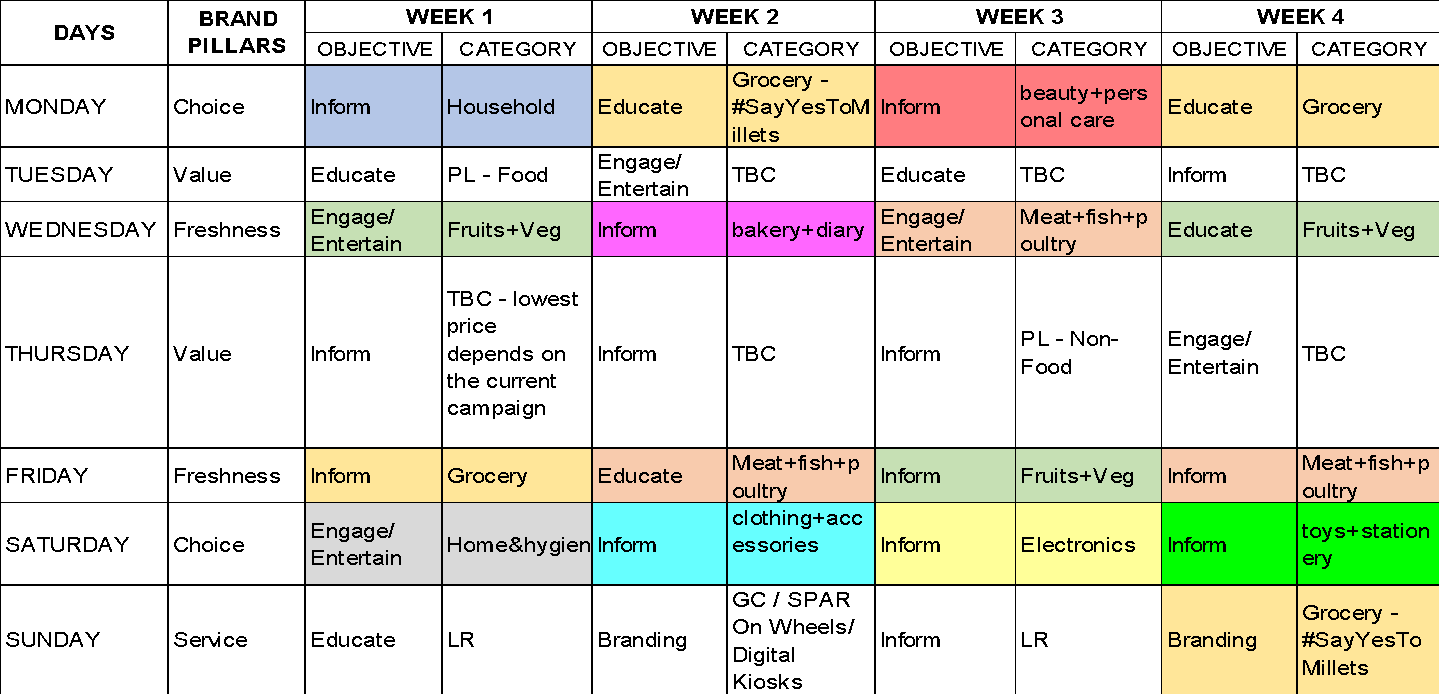
In its simplest form, a social editorial calendar provides an overview of your upcoming content, organized by platform and date. It allows you to organize your content assets, manage campaigns, and create an established schedule.
There are a few things you should include in your social media calendar:
The platform: which social media channels you will post on.
The date and time: when your content will be published.
Creative resources: including images, links, captions, videos or hashtags for each post.
A social media calendar can take many forms. It could be a Google sheet or calendar, an online planner, or content marketing software. Whatever you choose, your calendar should help you organize your posts and plan your content publishing.
Create your social media editorial plan in 6 steps
Creating a social media calendar can be relatively simple. It all depends on how complex what you want to publish is, how often, and how many accounts you have. Below are a few easy steps to create a social media editorial plan from scratch.
1. Take stock of your social media accounts
The first step is to take stock of all your existing social media accounts and the corresponding login credentials. This is necessary because you’ll need to confirm you have management access to all your accounts before you start scheduling your content. The advice is to create a spreadsheet that tracks:
Active profiles.
Inactive profiles.
Account username and/or email address and password.
Business profiles and personal profiles.
Target audience for each profile.
Who manages the profile (e.g. you, a team member, a marketing agency, etc.).
Outdated information that needs updating.
You might discover some outdated accounts or profiles for which you no longer have credentials. Now is your opportunity to delete old accounts, recover passwords, update outdated information, and even create new profiles if needed. After this effort, you should identify which accounts need to be managed and should be added to your social media post calendar.
2. Use a template or tool for your content plan
When you have a system or tool available, you can organize your social editorial calendar faster and more easily.This could be a simple spreadsheet, Google Calendar, or a software application.
Spreadsheets or Calendar for content planning
I like to use Google Sheets o Calendar for social content planning because it’s simple and requires less effort than using software tools. You can easily link content topics, publishing dates, content resources, and more.
There is a wide range of scheduling and planning software for social media available. Some are free (just a few) and others require a paid subscription. Most offer a free trial so you can test out their features before purchasing. Among the most popular platforms are:
Hootsuite
Buffer
AgoraPulse
Sprout Social
Loomly
eClincher
Zoho
I recommend trying out a few different trials to see what works best for you and your team. Your business may require specific features, more robust platform management, etc. The important thing is that you choose a system that allows you to easily create, schedule, and publish your content.
Social Editorial Calendar
3. Create a content matrix
Whether you decide to use a spreadsheet, a calendar, or software, the next step is to create your social media content matrix—this is your plan that outlines what content you intend to publish, as well as where and when you plan to publish it. Deciding what content to publish is the most important part of your social media plan. The success of your social strategy depends on your ideas for engaging content. There are some templates that can help you.
The 80-20 Principle (Pareto Principle)
The 80-20 principle, also known as the “Pareto Principle,” can be summarized as follows: 80% of your content should aim to inform, educate, or entertain your audience, and 20% of your content should be to promote your business (for example, to sell).
This means that the majority of your content should provide value to your audience above all else. This can include types of content such as:
How-to articles.
Helpful infographics.
Tutorials.
Educational videos.
Entertaining memes.
Photographs.
Expert interviews.
The remaining mix can include content types such as promotions, sales graphics, discount codes, or announcements.
The rule of thirds
Alternatively, you may want to follow the rule of thirds when it comes to your social content.
With this matrix:
One third of your content should serve to promote your business and generate conversions.
One third of your content should come from other thought leaders and industry publishers.
One third of your content should be fun content that encourages interaction with your followers.
This will help you create a healthy mix of content types and ensure that not all of your content is promotional. You need to build trust with your audience, increase engagement, and drive interactions—not just sales. The content marketingdoesn’t have to be boring. Try to find some creative topics that speak to your audience’s interests and entice them to engage with your brand.
4. Organize and schedule your content
Once you have a good mix of topics and content ideas, it’s time to pencil them into your content calendar.
If you’re using a spreadsheet, make sure to include the basic details:
Platform (e.g. Facebook).
Profile (e.g. Facebook.com/annabruno.journalist).
Publishing date.
Governance (that is, a team member who posts the content).
Time (and time zone).
Copy (e.g. Instagram caption and hashtags).
Visual elements (e.g. photo, video, meme, infographic, gif, etc.).
Link to creative assets.
When and how often you should publish content will depend on your niche and when your audience is active online. However, the best times to post on social media in general are from Tuesday to Thursday at 9:00 or 10:00 am. As you move forward with your social strategy, it will be important to monitor your analytics to see when users view and interact with your content. This can help you determine when to post content in the future. If you use a social media scheduling tool, you may also be able to schedule when your content is automatically published on each platform and monitor performance along the way.
When to post
5. Track your social media analytics
The effectiveness of your social media strategy will be influenced by your performance data. We recommend tracking which content is most appreciated, which posts get the most engagement, and which content is generating conversions for your business. This data will help you define your future content strategy and publishing schedule. This shouldn’t be a “set it and forget it” strategy, but instead requires ongoing optimization and planning.
Most social media platforms include their own version of analytics. There are also third-party software tools that track performance. You’ll have a large amount of data from which to extract social insights.
Here are some of the most important metrics to monitor:
Likes.
Clicks.
Comments.
Shares.
Brand mentions.
Profile visits.
Followers.
Reach.
Impressions.
Traffic.
Leads.
Over time, you’ll get a better sense of what content works best with your audience, which times are ideal for posting, and what types of content drive conversions and sales.
6. Listen to your audience
Your social media analytics will provide plenty of insights about the types of content your audience interacts with most. But sometimes it’s great to get content ideas and feedback directly from your followers, since most social tools won’t help you generate these unique content ideas.
Throughout your content calendar, you should schedule posts that ask your audience what they want to see. You can ask questions like:
“What questions do you have about [topic]?”
“What is the number one issue you need help with right now?”
“What topics do you want us to post more about?”
“What questions do you have for our team/brand?”
“What trending topic are you interested in right now?”
These questions are a great way to gauge audience interest and gather new content ideas. You can also get feedback on your existing content, which could help you revise your strategy or remove certain types of content from your matrix. Remember, content marketing on social media is all about keeping your audience engaged. So, you should be tuned in to what they want, what they struggle with, and what information they want to see on your channels.
Conclusion
Social media give you the freedom to publish all kinds of interesting, informative, inspiring, entertaining, and engaging content. They offer your brand multiple points of interaction with your audience in real time. The success of your social media strategy is supported by a well-executed plan.
Planning and scheduling your content in advance will make your content more effective and help you diversify it.Data drives the work.Use social media insights to see which content works best with your audience.Then review your strategy to achieve even better results, including more traffic and sales.
Usiamo cookie per ottimizzare il nostro sito web ed i nostri servizi.
Funzionale
Always active
L'archiviazione tecnica o l'accesso sono strettamente necessari al fine legittimo di consentire l'uso di un servizio specifico esplicitamente richiesto dall'abbonato o dall'utente, o al solo scopo di effettuare la trasmissione di una comunicazione su una rete di comunicazione elettronica.
Preferenze
L'archiviazione tecnica o l'accesso sono necessari per lo scopo legittimo di memorizzare le preferenze che non sono richieste dall'abbonato o dall'utente.
Statistiche
L'archiviazione tecnica o l'accesso che viene utilizzato esclusivamente per scopi statistici.L'archiviazione tecnica o l'accesso che viene utilizzato esclusivamente per scopi statistici anonimi. Senza un mandato di comparizione, una conformità volontaria da parte del vostro Fornitore di Servizi Internet, o ulteriori registrazioni da parte di terzi, le informazioni memorizzate o recuperate per questo scopo da sole non possono di solito essere utilizzate per l'identificazione.
Marketing
L'archiviazione tecnica o l'accesso sono necessari per creare profili di utenti per inviare pubblicità, o per tracciare l'utente su un sito web o su diversi siti web per scopi di marketing simili.